How to Digitize Your Library in 2026: A Complete Guide for Library Owners
How to Digitize your library with librainian
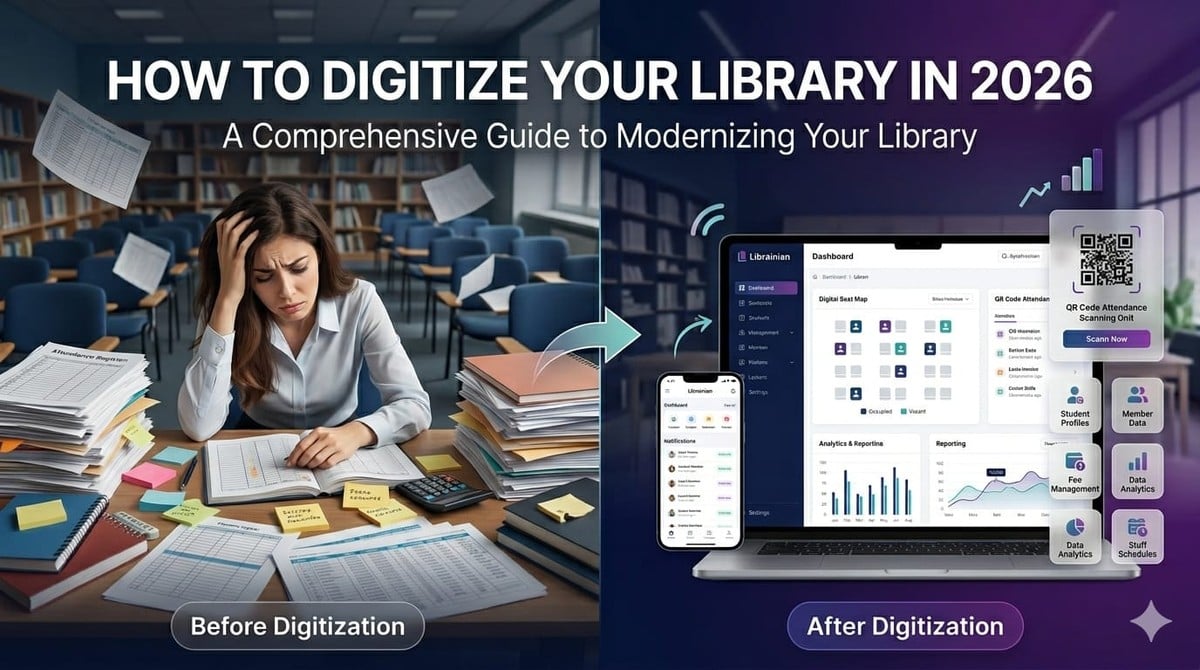
You started your library to create a productive space for students—not to spend your day buried in registers and spreadsheets.
Yet, every morning begins the same way. You take attendance, attend calls regarding seats, search for pending fees in notebooks and send reminder messages to students. As your membership expands, these routine tasks start to consume more and more of your time.
You spend hours running the place by the end of the day instead of making your library better or planning for the future.
If it feels like there’s an endless admin job to manage your library, it’s a sign your systems haven’t scaled with your business.
Most private libraries and reading rooms still depend on:
- Attendance registers
- Excel sheets
- Seat allocation notebooks
- Paper fee records
- WhatsApp reminders
- Manual student databases
These methods might work when there are 20 or 30 members. But as the library grows to 100, 200 or more students, it becomes more difficult to run operations. But as the library grows to 100, 200 or more students, it becomes more difficult to run operations.
The result?
- Hours wasted on administrative tasks
- Difficulty tracking seat availability
- Missed fee payments
- Scattered student records
- Increased chances of human error
What Does It Mean to Digitize a Library?
Many people think digitizing a library means converting books into digital files.
For private libraries, study centers, and reading rooms, it means something entirely different.
Library digitization means managing your daily operations through software instead of registers and spreadsheets.
This includes:
- Attendance management
- Membership management
- Seat allocation
- Shift management
- Fee collection
- Locker management
- Student communication
- Library performance tracking
All from a single dashboard.
This is exactly what Librainian helps library owners achieve.
Step 1: Create Your Digital Library Profile
The journey starts by creating your library profile.
Simply register your library on librainian and enter the basic information.
This becomes the digital foundation of your library and prepares the platform to manage:
- Students
- Seats
- Memberships
- Daily operations
In just a few minutes, your library gets its own digital workspace.
Step 2: Configure Your Library Structure
The next step is setting up how your library operates.
With Librainian, you can:
Create Your Seating Arrangement
Digitally map all seats in your library.
Define Shift Timings
Set up morning, evening, and full-day shifts.
Configure Lockers
Create and manage locker facilities.
Set Membership Plans
Define different packages and pricing structures.
This process essentially creates a digital version of your physical library.
Step 3: Add Your Students
Once your library setup is complete, it's time to onboard your members.
You can add:
- Student details
- Contact information
- Membership plans
- Assigned seats
- Shift details
- Locker allocations
Instead of keeping information in many registers and spreadsheets, everything is stored in one centralized database.
Step 4: Simplify Seat and Shift Management
One of the biggest issues for library owners is knowing how many seats are available.
Librainian solves this through a real-time seat management dashboard.You can instantly see:
- Vacant seats
- Occupied seats
- Reserved seats
- Inactive seats
This helps administrators allocate seats within seconds and avoid booking conflicts.
Shift management makes things even easier by organizing:
- Morning shifts
- Evening shifts
- Full-day memberships
without any confusion.
Step 5: Replace Registers with Smart Attendance
Attendance registers often become messy and time-consuming.
With Librainian, attendance becomes digital through:
- Smart Attendance
- QR Attendance System
Students can check in digitally, while administrators gain access to:
- Accurate attendance records
- Daily reports
- Attendance history
This significantly reduces errors and helps prevent proxy attendance.
Step 6: Automate Fee Management
Tracking payments manually is one of the most stressful parts of running a library.
Librainian simplifies this by allowing owners to:
- Monitor payment status
- Manage billing records
- Send fee reminders
- Track pending dues
Instead of following up with every student manually, the system handles most of the administrative work.
Additional Features That Complete the Digital Experience
Librainian also provides:
Locker Management
Digitally assign and monitor lockers.
Staff Management
Organize employee responsibilities.
Visitor Management
Track visitor activity and library traffic.
QR Book Tracking
Manage books and resources digitally.
Manual Library vs Digital Library
Manual ManagementDigital Management with LibrainianAttendance RegisterSmart Attendance & QR AttendanceSeat Allocation NotebookReal-Time Seat DashboardFee RegistersAutomated Billing & RemindersPaper RecordsCentralized Digital DatabaseManual Follow-UpsAutomated Notifications
The Biggest Transformation
Once your library goes live on Librainian, everything becomes centralized.
Attendance, memberships, seat occupancy, fee collection and student records all in a single dashboard.
Now you can spend your time on instead of hours a week on repetitive admin tasks:
- Improving student experience
- Increasing occupancy
- Growing your business
- Expanding your services
Final Thoughts
Digitising a library is no longer a future goal—it's a present necessity.
Libraries that still use manual systems are often faced with inefficiencies, missed revenue opportunities, and unnecessary administrative work.
Librainian enables library owners to manage everything from one platform and create a more organised, efficient and scalable library.
The question is no longer whether to digitise your library.
The real question is: How much time and revenue are you losing by not doing it yet?
Recent Articles
How to Manage a Library With 500+ Students Efficiently
How to Manage a Library With 500+ Students Efficiently — Learn how to manage a library with 500+ students using organised processes for student records, seats, shifts, attendance, fees, and memberships. Discover how Librainian helps private libraries and study centres manage these daily operations digitally from one place.

System Update: Addressing Recent Sign-In Errors and Platform Slowness
Experiencing delayed sign-ins or slow loading times? Read our latest system update on the temporary server changes we've made to resolve login failures and stabilize the platform.
Library Listing: How Students Can Discover Your Library Online
Library Listing: How Students Can Discover Your Library Online — Learn how a Library Listing can help private libraries, reading rooms, and study centres become easier to discover online. With Librainian, showcase your library, facilities, membership information, and special offers in one digital presence and help interested students take the next step toward joining.
Library Membership Offers: How to Create and Promote Special Offers
Library Membership Offers: How to Create and Promote Special Offers — Learn how library membership offers can help private libraries, reading rooms, and study centres promote special pricing, discounts, and membership opportunities. With Librainian, library owners can create their own offers and showcase them alongside library facilities on their digital library profile.
Online Admission Form for Library: How to Collect Student Admissions Easily
Online Admission Form for Library: How to Collect Student Admissions Easily — Learn how an Online Admission Form for Library can help private libraries, reading rooms, and study centres collect admission details directly from interested students, simplify enquiries, reduce paperwork, and make the admission process more organised with Librainian.

Digital Library Profile: Give Your Library a Professional Online Presence
Digital Library Profile: Give Your Library a Professional Online Presence- Learn how a Digital Library Profile can give your private library, reading room, or study centre a professional online presence, make important information easier for students to find, and help you introduce your library digitally with Librainian.
🏆 Most Viewed Articles
How to Manage a Library With 500+ Students Efficiently
How to Manage a Library With 500+ Students Efficiently — Learn how to manage a library with 500+ students using organised processes for student records, seats, shifts, attendance, fees, and memberships. Discover how Librainian helps private libraries and study centres manage these daily operations digitally from one place.
System Update: Addressing Recent Sign-In Errors and Platform Slowness
Experiencing delayed sign-ins or slow loading times? Read our latest system update on the temporary server changes we've made to resolve login failures and stabilize the platform.
Library Listing: How Students Can Discover Your Library Online
Library Listing: How Students Can Discover Your Library Online — Learn how a Library Listing can help private libraries, reading rooms, and study centres become easier to discover online. With Librainian, showcase your library, facilities, membership information, and special offers in one digital presence and help interested students take the next step toward joining.
Library Membership Offers: How to Create and Promote Special Offers
Library Membership Offers: How to Create and Promote Special Offers — Learn how library membership offers can help private libraries, reading rooms, and study centres promote special pricing, discounts, and membership opportunities. With Librainian, library owners can create their own offers and showcase them alongside library facilities on their digital library profile.
Online Admission Form for Library: How to Collect Student Admissions Easily
Online Admission Form for Library: How to Collect Student Admissions Easily — Learn how an Online Admission Form for Library can help private libraries, reading rooms, and study centres collect admission details directly from interested students, simplify enquiries, reduce paperwork, and make the admission process more organised with Librainian.
Digital Library Profile: Give Your Library a Professional Online Presence
Digital Library Profile: Give Your Library a Professional Online Presence- Learn how a Digital Library Profile can give your private library, reading room, or study centre a professional online presence, make important information easier for students to find, and help you introduce your library digitally with Librainian.

Best Library Management Software for Study Space
Best Library Management Software for Study Space — Choosing the right software can make managing a study space much easier. Learn which features matter most, including student management, seat allocation, subscriptions, billing, payments, attendance, and financial tracking, and discover how Librainian brings these essential operations together in one simple digital platform.

Best Library Management Software for Private Libraries
Best Library Management Software for Private Libraries — Choosing the right software can make managing a private library much easier. Learn which features matter most, including student management, seat allocation, subscriptions, billing, payments, attendance, and financial tracking, and discover how Librainian brings these essential operations together in one simple digital platform.

How to Start a Private Library in India: A Complete Guide for Beginners
How to Start a Private Library in India: A Complete Guide for Beginners — Learn how to start a private library from scratch, choose the right location, plan your seats and facilities, set membership pricing, attract students, and manage daily operations. Discover how Librainian helps you digitally manage students, seats, subscriptions, billing, security deposits, staff, and finances as your private library grows.
How Much Money Is Required to Open a Library? Complete Budget Guide for Beginners Cost to Open a Library
How Much Money Is Required to Open a Library? Complete Budget Guide for Beginners Cost to Open a Library — Discover the key costs involved in starting a library, from rent and furniture to internet, security, power backup, and other essential facilities. Learn how starting with an existing space and using Librainian can help you keep costs low while managing your library fully digitally from day one.